
Download Google Preview – Firefox add-on, search results preview, visual search, thumbnail preview, Google search enhancement, browser tool
Overview
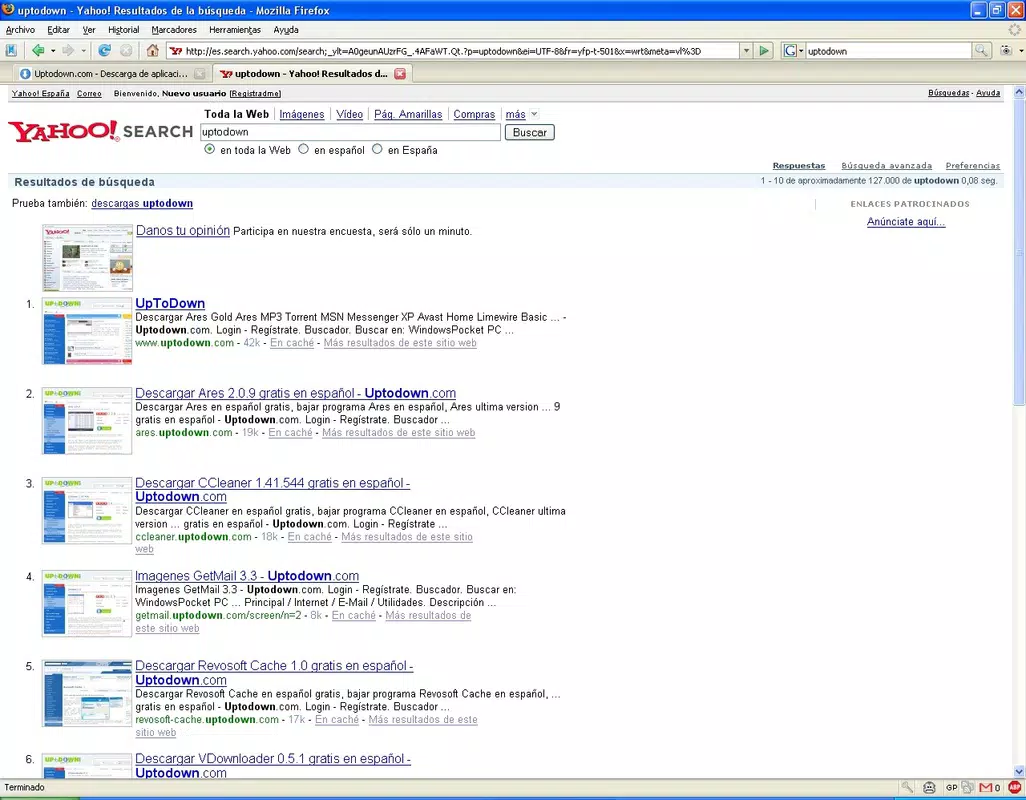
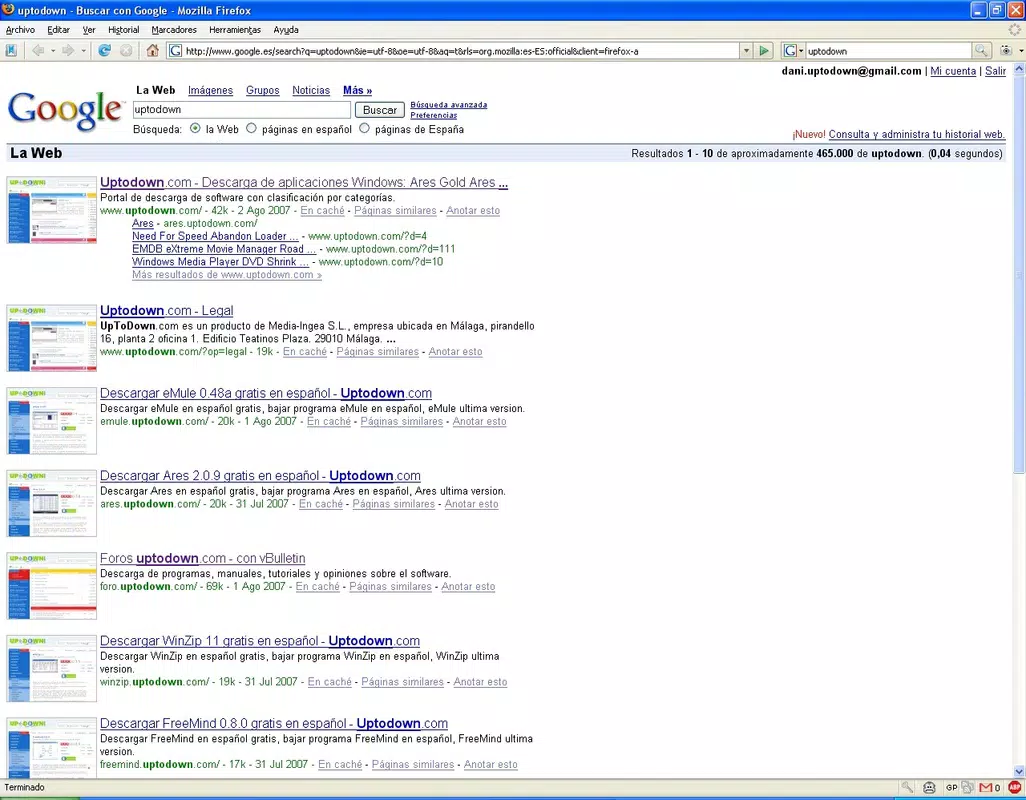
Google Preview is a browser add-on designed for Firefox users seeking a more intuitive and efficient search experience. Its primary purpose is to enhance Google search results by displaying thumbnail previews of websites directly alongside their titles. This visual aid helps users quickly assess the relevance and content of a webpage before clicking, reducing time spent on irrelevant sites. The tool is particularly useful for individuals conducting research, comparing sources, or browsing online for information where visual context is valuable.
By integrating seamlessly into the search process, Google Preview addresses a common pain point: the difficulty of judging a website’s content solely from its title and URL. With visual previews, users can make more informed decisions, improving both browsing speed and accuracy. The app targets frequent Google users, students, researchers, and professionals who rely on quick access to reliable information. While the developer, Google, is known for its vast suite of digital tools, specific details about the development team behind this add-on were not provided.
Real-world use cases include academic research, online shopping comparisons, and content discovery. For example, when searching for travel destinations, users can preview actual images of hotel websites or tourist sites before selecting a link. The add-on contributes to a more streamlined and visually enriched search ecosystem within the Firefox browser, positioning itself as a practical utility in the broader category of productivity tools.
Key Features & Functionality
- Thumbnail Previews: Google Preview generates small, real-time thumbnails of websites listed in Google search results. These visual representations offer immediate insight into a site’s layout and content, helping users determine relevance without opening the page.
- Seamless Integration: The add-on operates without disrupting the standard Firefox browsing experience. It runs in the background and does not interfere with page loading speed or navigation flow.
- User-Friendly Design: The interface is minimal and intuitive, requiring no setup or configuration. Users can begin benefiting from previews immediately after installation.
- Enhanced Search Efficiency: By providing visual cues, the tool reduces the need to click and discard multiple pages, thereby improving time management during online searches.
- Non-Intrusive Operation: The previews are displayed in a compact format that preserves the original search result layout, ensuring readability and usability across different screen sizes.
For instance, when searching for a recipe, users can view the actual layout of a food blog’s homepage before deciding to visit. This feature is especially beneficial for users with limited time or those accessing search results on mobile devices where screen space is constrained. The add-on enhances decision-making by combining textual and visual data, making it a valuable tool for information seekers.
Interface, UX & Performance
The interface of Google Preview is designed with simplicity and clarity in mind. Thumbnails are displayed in a compact, side-by-side format next to each search result title, maintaining the standard Google layout. The visual style is clean and unobtrusive, avoiding clutter while delivering essential information. Navigation remains fully intact, with no changes to the standard click behavior or search result ordering.
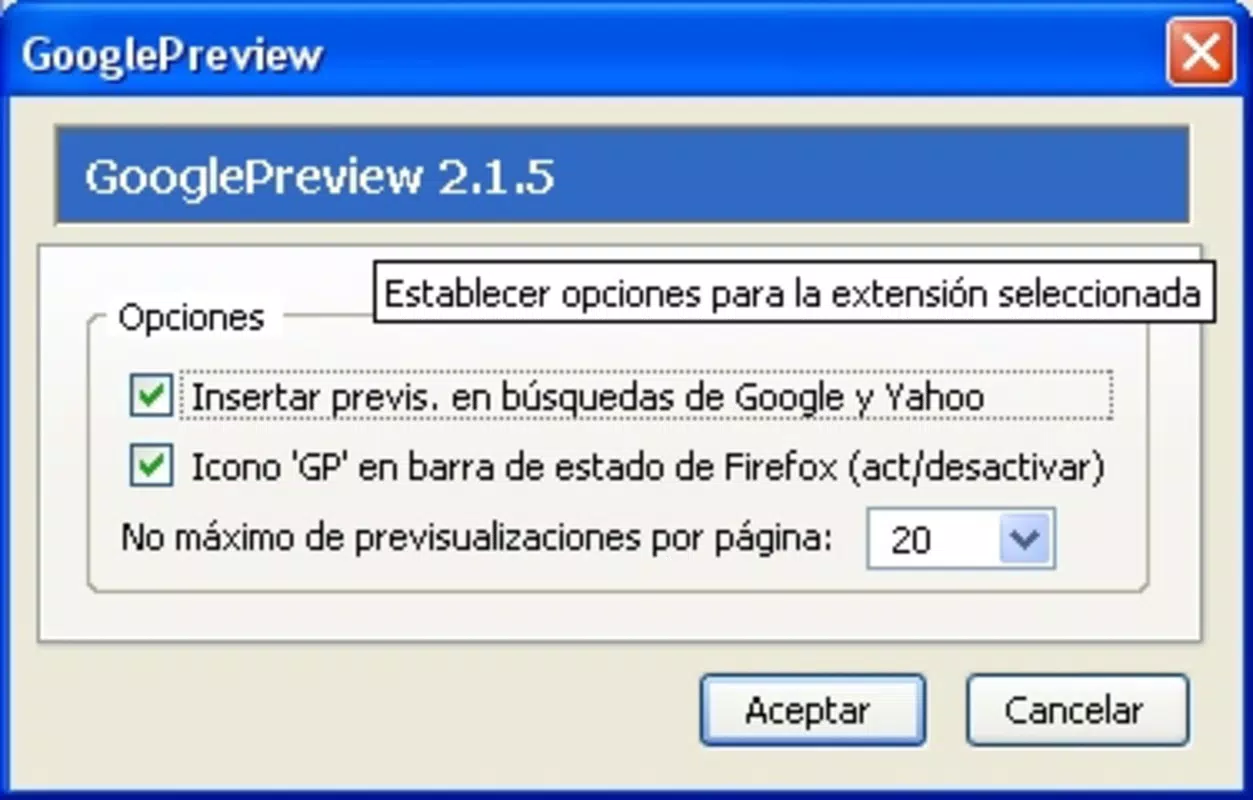
Usability is high across different user levels. The tool requires no learning curve—once installed, previews appear automatically. There are no settings to adjust, which contributes to a frictionless experience. Although the developer did not list formal performance metrics, the add-on is reported to operate efficiently without noticeable impact on browser speed or resource usage.
Responsiveness is consistent across various device categories, including desktops and laptops. The previews adapt to different screen resolutions and window sizes, ensuring readability and usability. Stability is maintained through regular updates, and the tool functions reliably during extended browsing sessions. Users can expect consistent performance without crashes or freezes.
Platform Compatibility & Technical Requirements
Google Preview is compatible with the Firefox browser. The app is available in version 1.1 and has a file size of 2.1 MB. It is designed specifically for desktop environments and does not support mobile versions of Firefox or other browsers.
The developer did not specify minimum OS requirements. However, since it is a Firefox add-on, it is intended for systems that support the Firefox browser, including Windows, macOS, and Linux. Compatibility with specific Firefox versions was not disclosed. Users are advised to ensure their browser is up to date to maintain optimal functionality.
Pros and Cons
Pros
- Provides immediate visual context for search results
- Operates without slowing down browser performance
- Simple, intuitive interface with no setup required
- Enhances decision-making during online research
- Free to download and use
Cons
- Available only for Firefox, not other browsers
- Does not support mobile devices or mobile browsers
- Thumbnail quality may vary depending on website design
- No customization options for preview size or display
- Updates are not frequently announced or tracked publicly
FAQ
Is Google Preview safe to install?
Yes, Google Preview is developed and distributed by Google, a trusted technology provider. The add-on is available through official Firefox channels and does not require access to sensitive user data.
Can I use Google Preview on mobile browsers?
No, Google Preview is currently only available for the desktop version of Firefox. It does not support mobile devices or mobile browser versions.
Does Google Preview affect my browsing speed?
According to user reports and technical analysis, the add-on is designed to operate efficiently without noticeable impact on page load times or browser responsiveness.
How do I update Google Preview?
Updates are typically delivered automatically through the Firefox Add-ons manager. Users should ensure their browser is updated to receive the latest version.
Is Google Preview free to use?
Yes, Google Preview is completely free. There are no subscription fees or in-app purchases.
Final Thoughts
Google Preview stands out as a lightweight yet powerful enhancement to the Google search experience within Firefox. Its ability to deliver visual previews of search results offers a tangible improvement in usability, especially for users who value efficiency and clarity. While limited to a single browser and lacking customization options, its seamless integration and zero cost make it a compelling choice for anyone conducting regular online searches.
For researchers, students, and professionals who rely on accurate and fast information retrieval, this tool adds real value. It reduces cognitive load by providing visual cues that complement textual results, leading to better-informed decisions. The lack of complexity and the absence of performance overhead further strengthen its appeal.
Despite its age—released in 2009—the add-on remains functional and relevant in today’s digital landscape. Its continued availability speaks to its enduring utility. For users seeking a smarter way to interact with search results, Google Preview delivers on its promise.
Download Google Preview now


